For shops, wholesalers and businesses with more than one branch
GST billing, stock and accounts
in one place.
Make a GST bill, and your stock and your accounts update by themselves. Nobody types the same thing twice.
Free for 14 days. No card needed. Try it with your own stock and your own customers first.
Billing
Bill fast at the counter, with GST on every bill.
Stock
See stock in every shop and godown, live.
Buying
Purchase orders, goods receipts, supplier payments.
Accounting
Proper double-entry books, updating as you sell.
GST
GSTR-1, GSTR-3B, e-way bill and e-invoice.
Payroll
Staff, attendance, salaries and payslips.
Ready in about a minute · Works with many branches · Leave any time and take your data
Real shops and wholesalers use EzyBook every day
14days
free to try, no card
~1min
to set up your account
0
setup fee, no contract
∞
invoices, on every plan
This is not a demo. Shops with many branches run their daily work on it. We have also moved one full year of real trading into it — sales, purchases, returns and bank statements — and every number matched.
The actual product
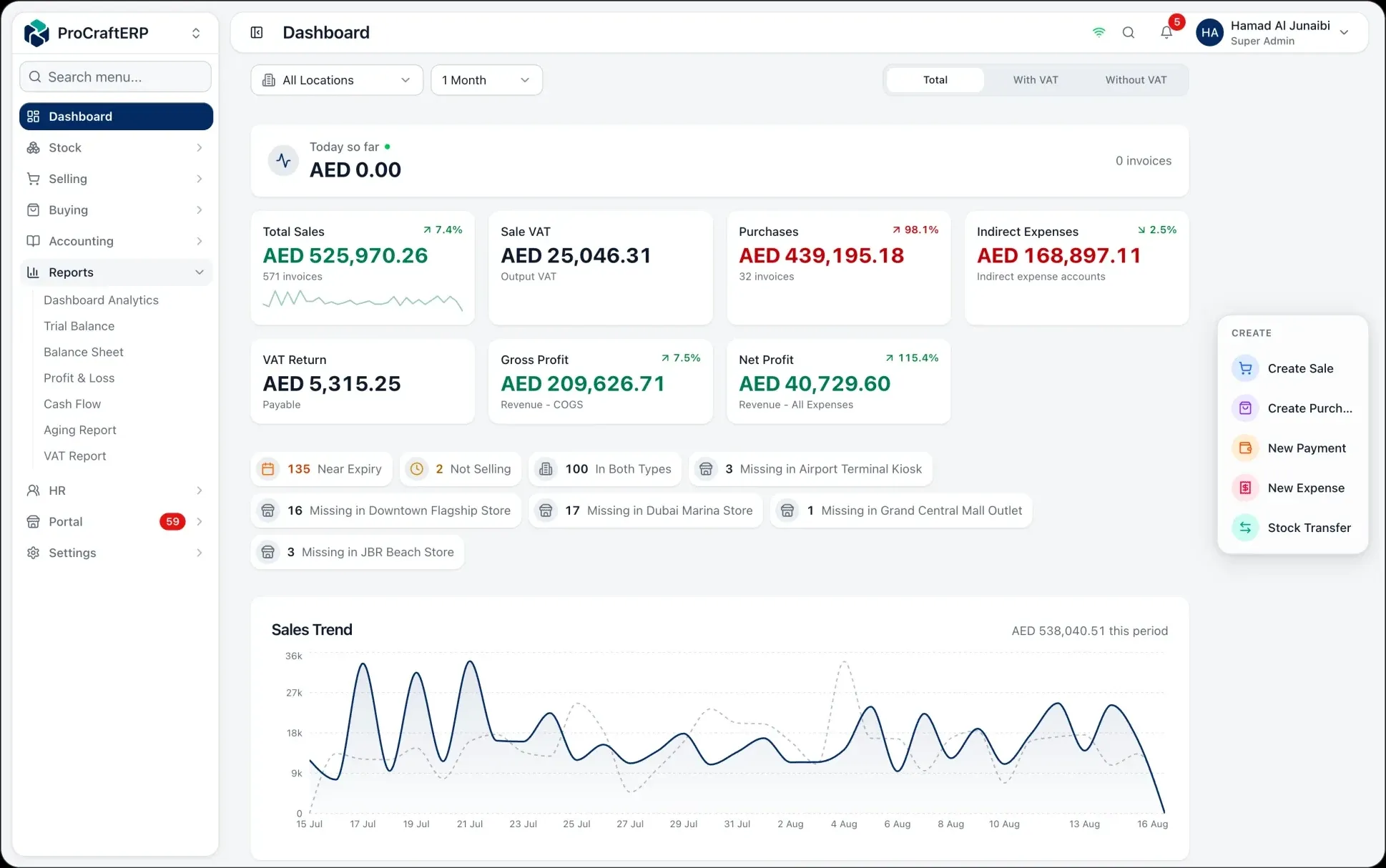
This is the real app. The numbers are made up.
The same EzyBook your team uses at the back-office desk and carries on the shop floor — sales from every branch, GST, profit and stock, live on every screen. The figures below belong to a business that does not exist. We do not put our customers’ books on our website.

See it move
How stock moves through EzyBook.
Stock moves from your supplier to your customer. Every move is counted, costed and posted — so the number on your shelf and the number in your accounts are always the same.
Before EzyBook
Your business runs on tools that don't talk to each other.
Your billing machine knows what you sold. An Excel sheet thinks it knows the stock. Half your orders are sitting in WhatsApp. And the accounts? They catch up three weeks later — if someone types it all again without mistakes.
This is not your staff's fault. It happens because your stock, your sales and your accounts are kept in three different places.
And it costs you real money. The customer nobody asked to pay. The stock the sheet says you have, but you do not have. The discount nobody approved. You lose it every month — you just never get a bill for it.
The workflow
From purchase order to finished accounts.
Six steps, one system. Each step hands its work to the next, and writes its own accounting entry as it happens. So by the last step, your accounts are already done.
Step 1 · Purchase
Raise the order.
Make purchase orders for your suppliers, with payment terms, expected cost, and the branch that will receive the goods.
38 open POsStep 2 · Receive
Receive the goods.
Receive against the order. The average cost of each item updates by itself, so you always know what your stock really cost you.
Average cost updatedStep 3 · Store
Store it in any branch.
Stock is kept for each branch, with batch numbers and expiry dates. Move it between branches and the record follows it.
12 warehousesStep 4 · Sell
Sell everywhere.
At the counter, on Shopify, or through your customer portal. Scan, pick the customer, done — the stock goes down at once.
247 orders todayStep 5 · Ship
Send it to the customer.
Pick, pack and send, with delivery notes and courier tracking, so you always know where an order went.
Delivery trackedStep 6 · Reconcile
Your accounts are already done.
Every step above already wrote its own accounting entry — cost, sales and GST. Your trial balance, profit and loss, and GST report are up to date right now.
Trial balance: balanced
What you get
Six things that are hard today. Simple here.
One platform
Everything your business does, in one system.
Nothing to bolt on, nothing to export from one tool to another. Every part writes to the same stock and the same accounts the moment something happens.
Purchasing
POs, receipts, supplier terms.
Receive against the order, with average costing.
Sales
Counter, online, and portal.
Transfers
Move stock between branches.
Returns
Credit & debit notes.
Payments
Collect, allocate, reconcile.
Analytics
Reports that are always up to date.
Profit and loss, balance sheet, cash flow, aging, GST.
Why EzyBook
Real accounting, without the months of setup.
EzyBook
One system, running in days.
- Live stock per product, per branch
- Proper double-entry accounts on every entry
- GSTR-1 and GSTR-3B figures from the ledger
- 173 permission controls, full audit log
The details we did not skip:
Starting
Try it on your own stock for 14 days.
Not a demo with fake data — your items, your branches, your bills. If it does not suit the way you work, you will know within a week.
Today
Your own workspace, in about a minute.
At your own web address, with your company name on it. No card, no sales call, nobody to book a meeting with.
Days 1–14
The full product, on your own stock.
Every branch, and every module you switch on. Bring in your items, make real bills, and see if the accounts come out right.
Day 15
We do not charge you.
There is no card saved, so there is nothing to charge and nothing to cancel. Pick a plan to carry on — or do not, and take your data with you.
Which one you are depends on branches and staff — not on features.
Professional
A few branches and a growing team.
- 5 staff user seats
- 3 locations
- accounting and payroll included
- No card to start
- Change or cancel any month
- Download your data any time
FAQ
What people ask before they start.
₹589 a month billed yearly (₹707 billed monthly) — that is one shop with stock, billing, purchasing and a POS, and no cap on how many invoices you raise. Double-entry accounting and payroll come with Professional; Shopify sync, an online store, a gym desk or a trust day-book are modules you turn on only if you want them, so you never buy one to unlock another. The first 14 days are free and you do not enter a card to begin.
Less than you expect. You import products, stock, customers and suppliers from Excel, and opening balances from CSV. The same tooling has moved a full year of live trading — sales, purchases, returns and bank statements — into a working deployment. You start from your own numbers, not from an empty system.
Yes. The CGST/SGST versus IGST split follows the customer’s place of supply rather than a box you tick, HSN and rate live on the item, and reverse charge is applied where it belongs. The GST report gives you GSTR-1 and GSTR-3B figures built from posted ledger entries, so what you file traces back to individual invoices instead of a spreadsheet. E-way bills and IRN e-invoicing are supported for when you cross those thresholds.
That is the normal case here, not an upgrade. Stock is tracked per product per location, transfers between branches leave a documented trail, staff can be limited to their own branch, and every report rolls up across all of them.
Yes, in detail. Roles are built from individual permissions, so a salesperson can sell at their own branch without ever seeing margins, payroll, or the other branches. Every action is logged with the user, the time and the IP address, so you can always see who changed what.
It keeps running, and your workspace becomes the source of truth behind it. Paid Shopify orders arrive as sales on their own, with stock deducted and accounting posted; your stock levels push back out to Shopify; and a built-in check proves the two agree. Anything that fails to sync queues up for a one-click retry.
Nothing is deleted the moment a payment fails. Your workspace goes read-only for a grace period, so you can still open it, read everything and export your data — you simply cannot post new transactions. Only after that does it suspend. Your data is yours, it is exportable throughout, and there is no contract to see out.
Start today. The first 14 days are free.
No card. No setup fee. Nobody to call. Your account is ready in about a minute, with your own data in it.
Want to look around first? The demo is the real app, filled with sample data. No signup needed.